# Cannot stream nor download from podcast
**URL:** https://forum.antennapod.org/t/cannot-stream-nor-download-from-podcast/4699
**Category:** Support
**Created:** [May 22, 2024, 12:16am UTC](https://forum.antennapod.org/t/cannot-stream-nor-download-from-podcast/4699 "2024-05-22T00:16:09Z")
**Posts on this page:** 20
**Page:** 1
### Author:  [@ixi](https://forum.antennapod.org/u/ixi)
#### Post date: [May 22, 2024, 12:16am UTC](https://forum.antennapod.org/t/cannot-stream-nor-download-from-podcast/4699/1 "2024-05-22T00:16:09Z")
I’m trying to add a new podcast, yet it wouldn’t stream nor download.
All I get is the following message:
java.util.concurrent.ExecutionException: javax.net.ssl.SSLHandshakeException: java.security.cert.CertPathValidatorException: Trust anchor for certification path not found.
AntennaPod asks for network issues (tried in different WiFis and via mobile data), VNP (nope) or auth-site (nope). Podcast is hosted on blubrry so it shouldn’t actually be a problem?!
Using AntennaPod-Version 3.4.0 (5f5d744e7) on Android 9.
---
### Author:  [@andbenn](https://forum.antennapod.org/u/andbenn)
#### Post date: [May 22, 2024, 7:42am UTC](https://forum.antennapod.org/t/cannot-stream-nor-download-from-podcast/4699/2 "2024-05-22T07:42:16Z")
Hrm. Interesting SSL error.
If you put the podcast URL into a browser, do you see the RSS feed text?
By chance, are you using an Android version from some other place than Google?
Have you done anything related to self-signed certificates or removing other certificates on the device?
---
### Author:  [@ixi](https://forum.antennapod.org/u/ixi)
#### Post date: [May 22, 2024, 8:05pm UTC](https://forum.antennapod.org/t/cannot-stream-nor-download-from-podcast/4699/3 "2024-05-22T20:05:47Z")
Thanks for the reply!
> [@andbenn](#):
>
> If you put the podcast URL into a browser, do you see the RSS feed text?
What exactly do you mean by “the podcast URL”? If I hit the little globe icon on the individual episode’s site, the episode’s website comes up in my browser.
> [@andbenn](#):
>
> By chance, are you using an Android version from some other place than Google?
Nope.
> [@andbenn](#):
>
> Have you done anything related to self-signed certificates or removing other certificates on the device?
Not that I know of. I might be a bit restrictive with access rights on the device, but everything I did was through standard setup apps and/or the Google Play Store.
---
### Author:  [@Matth78](https://forum.antennapod.org/u/Matth78)
#### Post date: [May 23, 2024, 6:01am UTC](https://forum.antennapod.org/t/cannot-stream-nor-download-from-podcast/4699/4 "2024-05-23T06:01:04Z")
> [@ixi](#):
>
> > [@andbenn](#):
> >
> > If you put the podcast URL into a browser, do you see the RSS feed text?
>
> What exactly do you mean by “the podcast URL”? If I hit the little globe icon on the individual episode’s site, the episode’s website comes up in my browser.
You have to copy RSS URL from your podcast, paste it in your browser as an address. Your browser should be able to show the feeds. (In XML forms probably, but extensions exists to format it. Not relevant here)
If your browser fail to display it then there is a problem with the feed. Or the feed (RSS) address is not correct.
---
### Author:  [@Canflu](https://forum.antennapod.org/u/Canflu)
#### Post date: [May 23, 2024, 6:58am UTC](https://forum.antennapod.org/t/cannot-stream-nor-download-from-podcast/4699/5 "2024-05-23T06:58:08Z")
I’ve got the same problem - the podcast I listen to is [http://372pages.com/](http://372pages.com/) - it worked about 2 weeks ago, now I can’t download any episodes (the feed itself works fine). Also, this isn’t related to the recent AntennaPod update, I think maybe it broke around 14th May, I see there was a cert change on the blubrry server then.
I tried downloading the mp3 from the feed in Chrome on Android, that works OK too, it’s only in AntennaPod that it fails mysteriously.
I’m using Android 9, AntennaPod 3.4.0 from the Play Store. The previous version of AnennaPod has the same issue, which would have been 3.3.2.
The download log says:
```auto
Unable to establish a secure connection. This can mean that another app on your device (like a VPN or an ad blocker) blocked the download, or that something is wrong with the server certificates.
Technical reason:
java.security.cert.CertPathValidatorException: Trust anchor for certification path not found.
File URL: https://media.blubrry.com/372pages/372pages.com/episodes/372pages_143.mp3
```
---
### Author:  [@Canflu](https://forum.antennapod.org/u/Canflu)
#### Post date: [May 23, 2024, 9:42am UTC](https://forum.antennapod.org/t/cannot-stream-nor-download-from-podcast/4699/6 "2024-05-23T09:42:44Z")
I’ve been able to test it using a new phone, and the downloads work correctly. I guess Android 9 is too old and doesn’t have the root certificate that the MP3 host uses ☹
---
### Author:  [@ixi](https://forum.antennapod.org/u/ixi)
#### Post date: [May 23, 2024, 1:57pm UTC](https://forum.antennapod.org/t/cannot-stream-nor-download-from-podcast/4699/7 "2024-05-23T13:57:27Z")
> [@Matth78](#):
>
> You have to copy RSS URL from your podcast, paste it in your browser as an address. Your browser should be able to show the feeds. (In XML forms probably, but extensions exists to format it. Not relevant here)
Feed looks okay. But that was to be expected as all the episodes display correctly.
> [@Canflu](#):
>
> I guess Android 9 is too old and doesn’t have the root certificate that the MP3 host uses ☹
How unfortunate. Anything one can do about that (easily)?
---
### Author:  [@Canflu](https://forum.antennapod.org/u/Canflu)
#### Post date: [May 23, 2024, 2:48pm UTC](https://forum.antennapod.org/t/cannot-stream-nor-download-from-podcast/4699/8 "2024-05-23T14:48:37Z")
My “solution” for this is going to be use NewPipe for this one podcast, as it is on Youtube too, and longer term buy a new phone. There’s a slim chance that Google adds the root certificate to their gubbins in the Play Services, I think they can do that, which may fix it, but otherwise as an end user there’s nothing you (or I) can do.
---
### Author:  [@ixi](https://forum.antennapod.org/u/ixi)
#### Post date: [May 23, 2024, 5:52pm UTC](https://forum.antennapod.org/t/cannot-stream-nor-download-from-podcast/4699/9 "2024-05-23T17:52:07Z")
Since the RSS seems to be able to be downloaded and parsed correctly – is there any possibility to manually download the files and place them within AntennaPod’s download directory? Or would I need to modify a database as well? 🤔
---
### Author:  [@Canflu](https://forum.antennapod.org/u/Canflu)
#### Post date: [May 24, 2024, 4:36am UTC](https://forum.antennapod.org/t/cannot-stream-nor-download-from-podcast/4699/10 "2024-05-24T04:36:30Z")
Not like that no, I tried putting the files in the download directory and they are not recognised. It shows as not downloaded. I did download the file manually and import the directory though, that worked. So I have the RSS feed and a separate podcast that’s the local folder.
---
### Author:  [@annforumantennapod](https://forum.antennapod.org/u/annforumantennapod)
#### Post date: [May 27, 2024, 6:07pm UTC](https://forum.antennapod.org/t/cannot-stream-nor-download-from-podcast/4699/11 "2024-05-27T18:07:37Z")
I have same error shown in the download log clip shown above. Started a few weeks ago, only affects 3 of 20+ pods I subscribe to. The error occurs on all episodes from these three podcasts including episodes I’d previously downloaded successfully. Things I’ve tried that haven’t fixed issue: re-subscribing via RSS URL, deleting app install and rebuilding subscription. Phone is Samsung j3 2017 with OS 8.1.0, app version 3.4.0 (5f5d744e7) downloaded from Play Store. Creators for these three podcasts say no other users have reported problems.
---
### Author:  [@kostecke](https://forum.antennapod.org/u/kostecke)
#### Post date: [May 27, 2024, 11:21pm UTC](https://forum.antennapod.org/t/cannot-stream-nor-download-from-podcast/4699/12 "2024-05-27T23:21:10Z")
I’m having the same issue with another podcast hosted at blubrry.
It seems that it started around the time that the [media.blubrry.com](http://media.blubrry.com) SSL cert was renewed.
---
### Author:  [@Canflu](https://forum.antennapod.org/u/Canflu)
#### Post date: [May 28, 2024, 9:46pm UTC](https://forum.antennapod.org/t/cannot-stream-nor-download-from-podcast/4699/13 "2024-05-28T21:46:46Z")
I contacted blubrry support out of desperation, and I think they fixed it! I’ve been able to download again anyway.
---
### Author:  [@ixi](https://forum.antennapod.org/u/ixi)
#### Post date: [May 28, 2024, 10:44pm UTC](https://forum.antennapod.org/t/cannot-stream-nor-download-from-podcast/4699/14 "2024-05-28T22:44:07Z")
Me too! Thank you very much for your initiative!! 😍
---
### Author:  [@ixi](https://forum.antennapod.org/u/ixi)
#### Post date: [August 6, 2024, 7:04am UTC](https://forum.antennapod.org/t/cannot-stream-nor-download-from-podcast/4699/16 "2024-08-06T07:04:34Z")
It seems that they’ve updated again. Anyway, I’ll try the workaround provided by @Canflu and try to contact blubrry support with a sufficient amount of desperation. 😉
---
### Author:  [@Canflu](https://forum.antennapod.org/u/Canflu)
#### Post date: [August 6, 2024, 9:08am UTC](https://forum.antennapod.org/t/cannot-stream-nor-download-from-podcast/4699/17 "2024-08-06T09:08:16Z")
The antenna pod devs have fixed the cert issue in a forthcoming release by adding the incompatible root certificate to the application’s internal configuration. So these busted downloads should work again on old Android versions like ours when the 3.5 version is released (at the time of writing, the version on the Play store is 3.4.1, but it looks like 3.5 beta is being tested on github).
---
### Author:  [@ByteHamster](https://forum.antennapod.org/u/ByteHamster)
#### Post date: [August 6, 2024, 5:18pm UTC](https://forum.antennapod.org/t/cannot-stream-nor-download-from-podcast/4699/18 "2024-08-06T17:18:36Z")
3.5.0-beta1 containing the new certificate should now be available to all Google Play beta testers. See [Beta testing – AntennaPod](https://antennapod.org/documentation/general/beta)
---
### Author:  [@plist](https://forum.antennapod.org/u/plist)
#### Post date: [August 7, 2024, 5:01am UTC](https://forum.antennapod.org/t/cannot-stream-nor-download-from-podcast/4699/19 "2024-08-07T05:01:39Z")
I installed 3.5.0-beta1 and still got the same error:
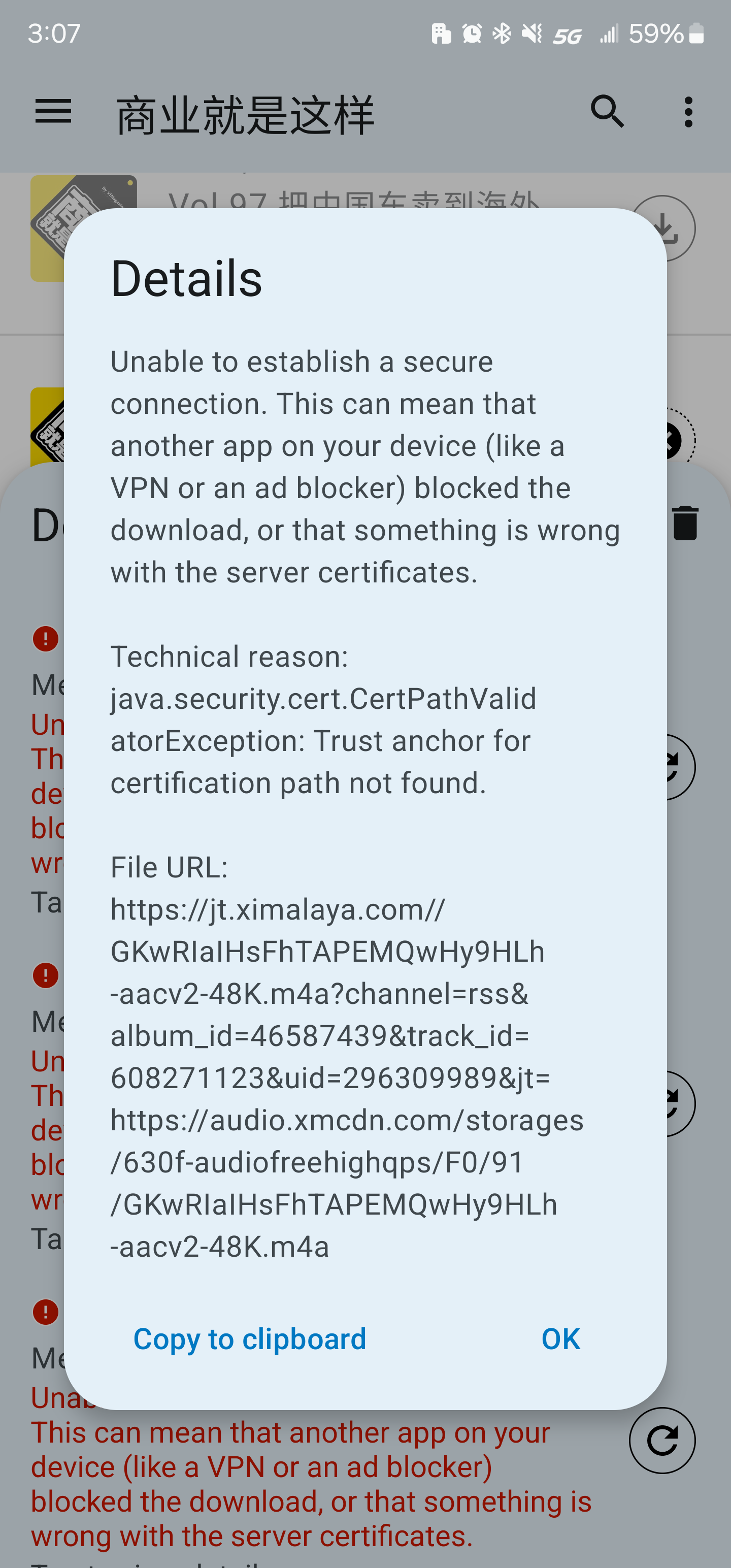
---
### Author:  [@plist](https://forum.antennapod.org/u/plist)
#### Post date: [August 9, 2024, 9:56pm UTC](https://forum.antennapod.org/t/cannot-stream-nor-download-from-podcast/4699/20 "2024-08-09T21:56:14Z")
Update: I can stream and download podcasts hosted on ximalaya today. Not sure what was changed on their side.
---
### Author:  [@system](https://forum.antennapod.org/u/system)
#### Post date: [December 7, 2024, 9:56pm UTC](https://forum.antennapod.org/t/cannot-stream-nor-download-from-podcast/4699/21 "2024-12-07T21:56:52Z")
This topic was automatically closed 120 days after the last reply. New replies are no longer allowed.