# How syncronization works actually?
**URL:** https://forum.antennapod.org/t/how-syncronization-works-actually/372
**Category:** Support
**Created:** [November 17, 2020, 8:43am UTC](https://forum.antennapod.org/t/how-syncronization-works-actually/372 "2020-11-17T08:43:28Z")
**Posts on this page:** 6
**Page:** 1
### Author:  [@TaurohtaR](https://forum.antennapod.org/u/TaurohtaR)
#### Post date: [November 17, 2020, 8:43am UTC](https://forum.antennapod.org/t/how-syncronization-works-actually/372/1 "2020-11-17T08:43:28Z")
**App version** : 2.0.3 Google Play
**Android version** : 10.0
**Device model** : Oneplus 7
**Expected behaviour** : Episodes that previously where played should be marked as played after synchronization
**Current behaviour** : Episodes that previously where played not marked as played after synchronization
**Steps to reproduce** :
1. Install AntennaPod
2. Import a few podcast subscription via importing OPML
3. Enable synchronization via login to [gpodder.net](http://gpodder.net)
4. Mark some episodes as played
5. Start Force sync to synchronize
6. Uninstall AntennaPod
7. Enable synchronization via login to [gpodder.net](http://gpodder.net) and selecting an existing device that you created at step 3.
8. Wait for podcasts to synchronize
9. Start Force sync to synchronize
---
### Author:  [@ByteHamster](https://forum.antennapod.org/u/ByteHamster)
#### Post date: [November 17, 2020, 5:10pm UTC](https://forum.antennapod.org/t/how-syncronization-works-actually/372/2 "2020-11-17T17:10:21Z")
Hi! Did you come across this post? It explains gpodder and some of its settings in more detail.
> [@Question about AntennaPod and gpodder](https://forum.antennapod.org/t/question-about-antennapod-and-gpodder/45/2):
>
> Hi, For synchronization, AntennaPod uses the free service [gpodder.net](http://gpodder.net). In order to synchronize your clients, you need to create an account there. After you created the account, I suggest to create a device on [gpodder.net/devices/](http://gpodder.net/devices/) for each client that you use: [image] After you created the devices, link them using the “Configure” button. This way, [gpodder.net](http://gpodder.net) automatically keeps the subscriptions of both devices synchronized. [image] Then, have a look at AntennaPod’s Settings » Integration…
---
### Author:  [@TaurohtaR](https://forum.antennapod.org/u/TaurohtaR)
#### Post date: [November 17, 2020, 5:38pm UTC](https://forum.antennapod.org/t/how-syncronization-works-actually/372/3 "2020-11-17T17:38:36Z")
Yep, I have seen that post but still, it is confusing for me.
I tried to use also second Linux client and it didn’t work for me I guess because I haven’t created a device before login in at the second client.
I’m not talking about 2 devices in this case but about just 1 that gets readded after reinstallation and selecting an already existing device.
In my humble opinion, in such a case, it should sync already played episodes, but it doesn’t as far as I see.
---
### Author:  [@ByteHamster](https://forum.antennapod.org/u/ByteHamster)
#### Post date: [November 17, 2020, 5:51pm UTC](https://forum.antennapod.org/t/how-syncronization-works-actually/372/4 "2020-11-17T17:51:21Z")
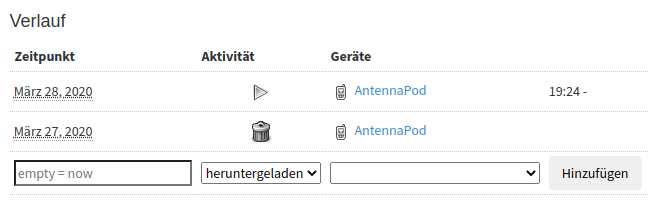
Does the gpodder website show that the episodes are played? You can check that on the “Episode history” page:
---
### Author:  [@TaurohtaR](https://forum.antennapod.org/u/TaurohtaR)
#### Post date: [November 17, 2020, 5:58pm UTC](https://forum.antennapod.org/t/how-syncronization-works-actually/372/5 "2020-11-17T17:58:19Z")
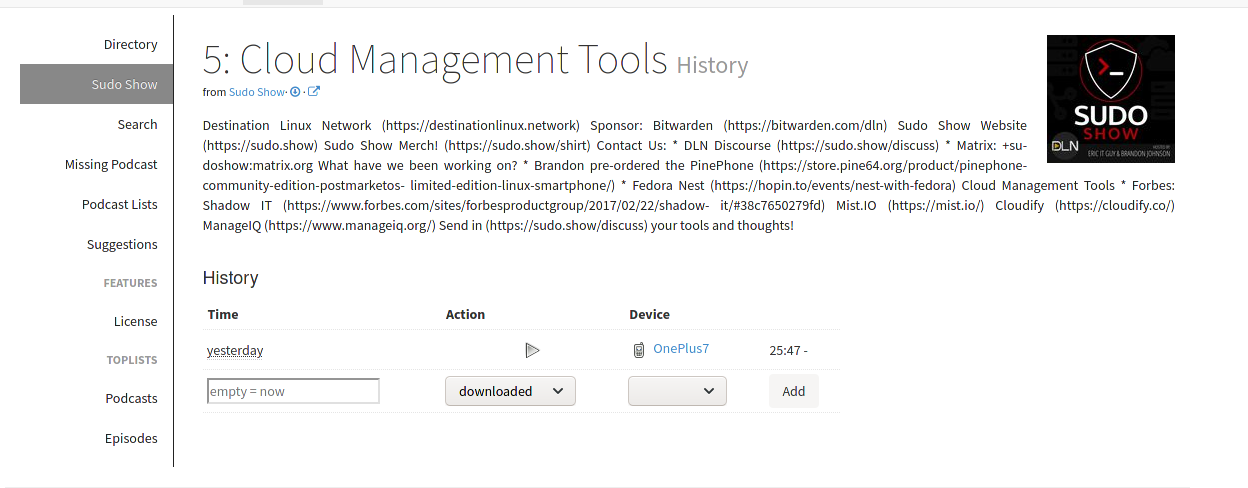
Yes, it is checked as played. Here is one example.
---
### Author:  [@system](https://forum.antennapod.org/u/system)
#### Post date: [February 25, 2022, 8:11am UTC](https://forum.antennapod.org/t/how-syncronization-works-actually/372/6 "2022-02-25T08:11:15Z")