App version: 3.11.0 Google Play
Feature I want: Preprocess skip silence
Suggested solution: Select an individual file, multiple files, or folder and “Preprocess skip silence”. This will overwrite the current audio file with an audio file where “skip silence” has already been applied.
If you don’t want to “overwrite” the existing file, you can create a duplicate of the file in an output folder. This can be configured in the settings.
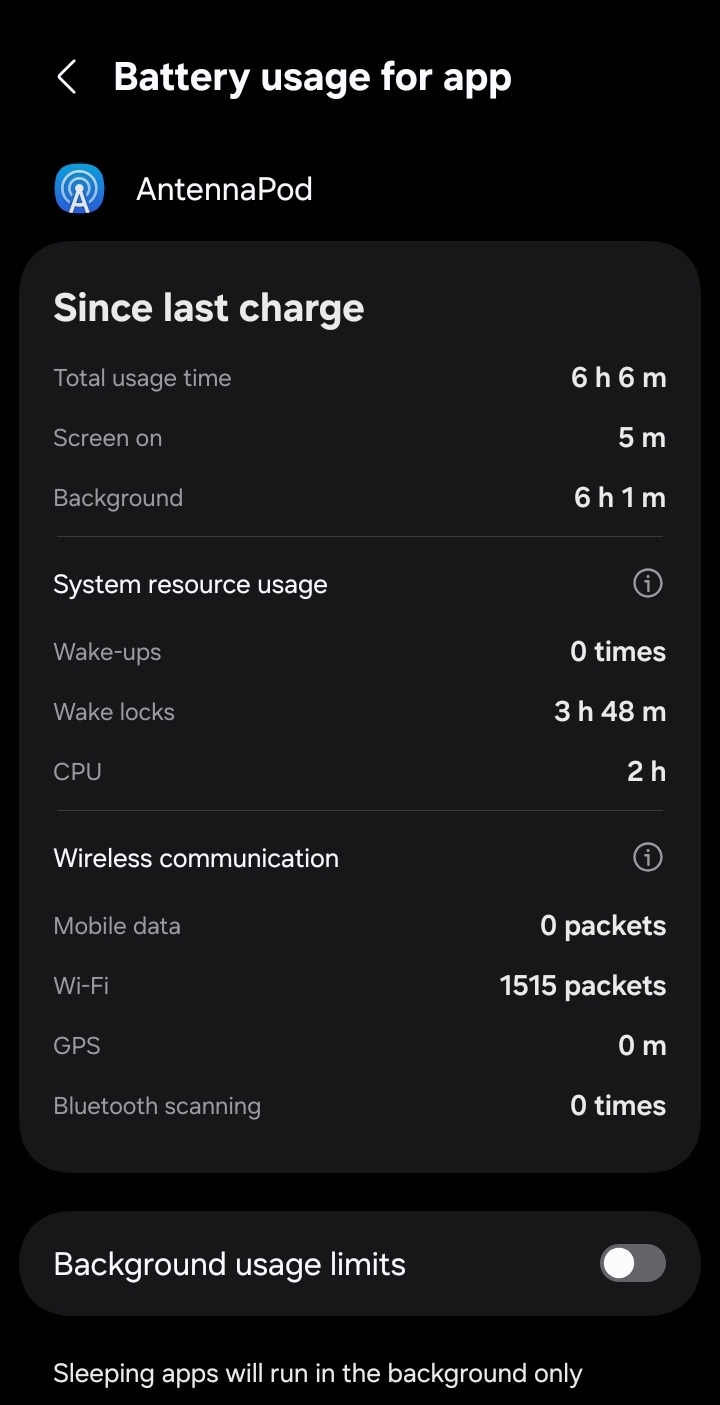
Technical details: I listen to audiobooks via antenna pod and use the “skip silence in audio” feature. In 6 hours of running the feature, it wake-locks 50% of the time and uses 25% cpu usage. Which means for every hour of running the feature, it drains 1.8x the battery without the feature on.
I would like to preprocess the skip silence function so that I can run the feature while my phone is charging.
Then, when I’m listening on the go, I’ll have 2x more battery.
(Most books are around 20%-50% faster when you cut out the slow pauses between each sentence, paragraph, and chapters. Since audiobook’s are required to have 250-500 ms of silence between each sentence, and 1000 ms between each paragraph, and 2000-3500 ms between each chapter.)