App version: 2.0.3 (81e2be8f2) from Google Play
Android version: 11
Device model: Pixel 2
Expected behaviour: A sane amount of notifications in the media
Current behaviour: Too many notifications in the media bar. I don’t know why they are there.
First occurred: Once updated to Android 11
Steps to reproduce:
- Listen to several podcasts from queue
- Notice many media notifications. See screenshot
Environment: I am using bluetooth headphones.
Screenshot: https://postimg.cc/4YLZW403
Welcome and thanks for joining the forum. I don’t know why this happens, I had the same thing when I updated to Android 11. I could be wrong and hopefully @ByteHamster can give the correct answer. But what solved it for me was changing my settings for how a podcast is handled after an episode has completed. I changed it to delete immediately, where I previously I had set to delete after 24 hours.
That may only be a temporary solution and it may actually be a bug.
We already have this tracked on GitHub but unfortunately I have no idea why this happens. Android 11 changed something related to their media notifications. Until this is fixed, Android has a setting to stop displaying the notification as soon as the media session ends (it’s somewhere next to those notifications).
That’s interesting. Not sure if it fixes all cases, though (I can reproduce this even when pressing just play+pause on one single episode). I will have a look if the deletion setting has an influence for me, too.
I couldn’t find the Android setting to stop displaying the notifications.
Swipe the media player section to the side:
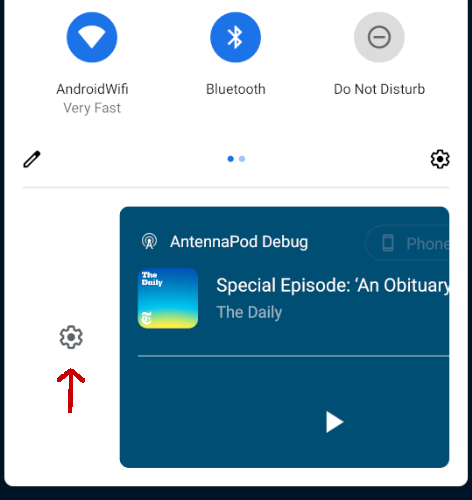
This swipe option doesn’t seem to exist on Samsung, unfortunately.
Running Android 11 on S10e
Weird… Alternatively you could try :
- to tap history in android notification. It would open history of all your notifications and there you can long press one to directly access to notifications settings for the app you long pressed
- or go to android settings, notifications and apps, select AntennaPod and it will open app info where you can access system notification for the app
@Hmilgraum Another option (that works on my phone) is long-pressing the notification (some options appear, with a cogwheel in the top-right).