I have uninstalled/reinstalled, restarted etc but the big rectangle widget doesnt show the current episode, its just the default picture/tool buttons like no episode is playing. This is the only podcast player I like but the widget is pretty key to that so I hope it can be fixed
High praise! I hope there is a straightforward way to address what you’re seeing.
Are you saying that no information about the episode is provided, or that only the cover image is not shown? If that’s the case, make sure that plenty of storage is available on the phone, since the cover image has the lowest priority for storage. Also, if you are on mobile data most of the time, make sure that mobile download is enabled for cover images.
2 Likes
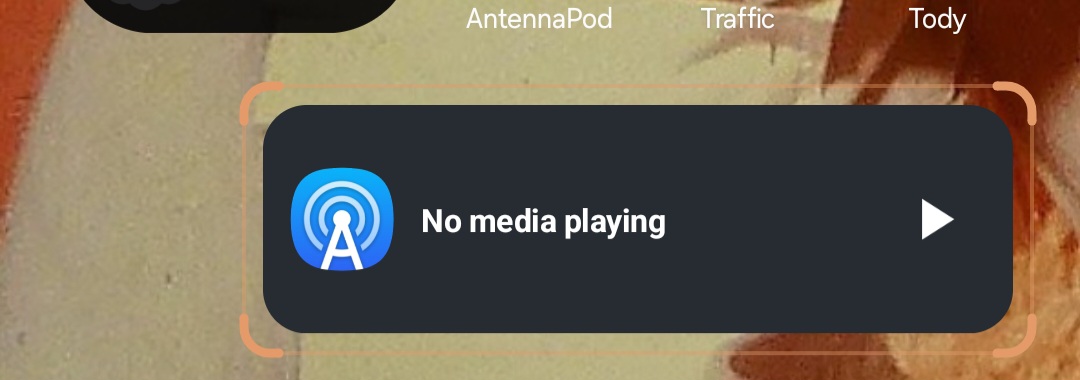
Should have attached an image, it just looks like this forevereven when I am listening to something.
In the app, go to your Queue and start playing. The widget should then update.
It doesnt :c cool opus, I love him.
When did you drop the widget on your phone screen? Are you using Android or one of the flashable third party images?
Its been on my screen for a while, but when it showed like that I removed/put it back a few times, still looks like that. Im on android and its the most recent update of antennapod.
I’m at a loss as to why the widget became disconnected with the application state. Hopefully someone else can add some wisdom.
Kudos on recognizing Opus. He’s not as popular these days as he used to be. 
Thanks for trying! I miss bloom county
It sounds like the system might be ‘killing’ the widget’s background process to save battery. Have you checked if AntennaPod is set to ‘Don’t optimize’ in your phone’s battery settings? Also, if you’re on a Samsung/Pixel, sometimes the ‘Adaptive Battery’ feature prevents widgets from updating in real-time. Giving it unrestricted battery access usually fixes that ‘disconnected’ feeling!
Thank you for your suggestions! At a certain point there was an update and now its fixed, I forgot to delete this though. Thanks!